

A quick word on MIPS and QtSPIM is on order. In previous posts I linked to a MIPS assembly language command reference, but neglected to provide any links to system calls. I'm helping out some students with MIPS lab this semester and they don't seem to have the information they need on this subject. So, for anyone who needs it, here are a couple links for MIPS system calls:
http://students.cse.tamu.edu/wanglei/csce350/reference/syscalls.html
This link's information is taken directly from Jim Larus's book "SPIM S20: A MIPS R2000 Simulator".
http://courses.missouristate.edu/kenvollmar/mars/help/syscallhelp.html
Contains more detailed information regarding MIPS in QtSPIM as well as for MARS (MIPS Assembler and Runtime Simulator).
MARS is another program that serves a similar purpose as QtSPIM.
Below are a couple links I reposted from one of my previous blog entries:
http://msdn.microsoft.com/en-us/library/ms253512%28v=vs.80%29.aspx
A list of MIPS registers and what they are used for.
http://www.mrc.uidaho.edu/mrc/people/jff/digital/MIPSir.html
A comprehensive MIPS command reference.
Hope these help someone.
Showing posts with label QtSPIM. Show all posts
Showing posts with label QtSPIM. Show all posts
Tuesday, February 11, 2014


Wednesday, December 14, 2011
MIPS 32 Register Swap Example Using QtSPIM

I've been away from my blog the past several weeks due to term papers, final exams and other mini-emergencies.
During that time I have seen a huge number of hits on my MIPS Example code page. You can find it here:
http://inkarlslab.blogspot.com/2011/09/mips-32-example-program-using-qtspim.html
In case folks would like some more code examples, I've published this piece of code - based loosely on one of my lab assignments this semester.
This code prompts the user to enter two integers through the console, places them into registers, then swaps the contents of those registers. It does so without the use of the MIPS "move" command. As with my previous material, it was run using the SPIM emulator version 9.1.4 - dated September 4, 2011.
CAVEATS: This is not the most elegant way of doing it. It was my first attempt at doing a register swap. This can actually be done using three or four lines of code, rather than my five, but my professors might get a bit angry if I gave away all the answers here. But this code does work and should help folks to get a head start on writing simple MIPS programs.
The complete code is as shown below. Simply copy and save this as "integer_swap.asm", or whatever .asm filename you like, using any convenient text editor such as Windows Notepad or LINUX Gedit.
NOTE: Sorry about the crummy formatting - I'm having trouble with tabs in the blogger interface.
===========================================================
## Program reads variables from console into registers
## then swaps the contents of those registers.
## Prints out contents before and after swap.
##
##
##
## Registers used:
## $v0 - syscall parameter and return value
## $a0 - syscall parameter
## $s1 - holds x
## $s2 - holds y
## $t0 - holds temp value
.text
main: # SPIM starts execution here
## Let's get x
la $a0, enter_x # Print msg for x
li $v0, 4
syscall
## read x into $s1.
li $v0, 5 # syscall 5 = read integer
syscall
move $s1, $v0 # x = Integer just read
## Message for x
la $a0, print_s1 # Prints "$s1 = "
li $v0, 4
syscall
## Let's display initial value of $s1 - so read x into $a0.
move $a0, $s1 # Move contents of $s1 into $a0
li $v0, 1 # Syscall for 'print integer'
syscall # Print value in $a0
## Print carriage return
la $a0, print_ret
li $v0,4
syscall
## Now, let's get y
la $a0, enter_y # Print msg for y
li $v0, 4
syscall
## read y into $s2.
li $v0, 5 # syscall 5 = read integer
syscall
move $s2, $v0 # y = Integer just read
## Message for y
la $a0, print_s2 # Prints "$s1 = "
li $v0, 4
syscall
## Let's display initial value of $s2 - so read y into $a0.
move $a0, $s2 # Move contents of $s2 into $a0
li $v0, 1 # Syscall for 'print integer'
syscall # Print value in $a0
## Print carriage return
la $a0, print_ret
li $v0,4
syscall
## Now, let's try and swap them - WITHOUT using 'move' command!!
addi $t0, $s2, 0 # Add the contents of $s2 into $t0
sub $s2, $s2, $s2 # Subtract the contents of $s2 from itself, thus zeroing it out
addi $s2, $s1, 0 # Add contents of $s1 into $s2
sub $s1, $s1, $s1 # Subtract the contents of $s1 from itself, thus zeroing it out
addi $s1, $t0, 0 # Add contents of $t0, same as former $s2, into $s1
## Now, lets print out the results:
la $a0, print_s1 # Prints "$s1 = "
li $v0, 4
syscall
move $a0, $s1 # Prints contents of $s1
li $v0, 1 # Syscall for printing of variable type integer
syscall
## Print single carriage return
la $a0, print_1ret
li $v0,4
syscall
la $a0, print_s2 # Prints "$s2 = "
li $v0, 4
syscall
move $a0, $s2 # Prints contents of $s2
li $v0, 1 # Syscall for printing of variable type integer
syscall
## Print carriage return
la $a0, print_ret
li $v0,4
syscall
exit:
li $v0, 10 # These two lines here for smooth exit from program
syscall
.data
enter_x: .asciiz "Enter a number for x, and press 'ENTER': " # Console prompt to enter the value for x
enter_y: .asciiz "Enter a number for y, and press 'ENTER': " # Console prompt to enter the value for y
print_s1: .asciiz "$s1 = " # Screen output to console
print_s2: .asciiz "$s2 = " # Screen output to console
print_1ret: .asciiz "\n"
print_ret: .asciiz " \n \n \n"
=======================================================
The picture above shows what should happen when you run the program using SPIM.
A slight variation of the problem asks you to do this without using a third register for temporary storage of one value (as was done here).
This basic algorithm can be modified slightly to permit the integers to be swapped WITHOUT using a third register.
HINTS: You will only need three or four lines of code to do the actual swap. There are basically two ways I know of to do it: 1) Use "add" and "sub" operations or 2) use XOR operations.
Hope this information is of help to someone.
Thursday, November 3, 2011
QtSPIM And MIPS Instructions Using Float And Double Variables
This week, we had a lab assignment in my computer engineering class that required us to perform arithmetic operations on float variables. I quickly learned that the standard add, addi, sub, mov, ... instructions do NOT work properly on float variables. This was not explained in ANY of the literature I had prior to 15 minutes ago. Also, you apparently cannot use the standard $s0 - $s8, $t0 - $t3, ... registers for storing float or double type variables. There are special floating point registers that are used for this but are also not often discussed in the usual MIPs tutorials. So I went to Google and searched terms such as SPIM+"float variables", and SPIM+"float registers". Only then did this other information suddenly appear.
The following link should prove quite useful for anyone trying to do this:
A much more complete listing of MIPS Instructions - Including those using Float Registers
http://www.dsi.unive.it/~arcb/LAB/spim.htm
Look at pages 21 - 23 and note the instructions such as add.s, sub.s, mov.s for manipulating single precision float variables. If you are working with double precision variables, use add.d, sub.d, mov.d, ... MIPS uses a floating point coprocessor - it has special registers numbered $f0 - $f31. So, what I get from this is instead of using the $s0, $s2, and $t0 registers my professor told me to use on integers, I will have to use registers $f2, $f3, $f4, for example. Registers $f0 and $f12 are reserved in QtSPIM for reading and printing floats, respectively - so don't use them for storing/manipulating your arithmetic variables. After you perform an arithmetic operation, you will have to move that result to $f12 before you can print the answer to the console. Likewise, if your program reads a float variable from the console, you will have to fetch that number from f.p. register $f0 and place it into another - such as $f3, or wherever, before manipulating it.
If you are doing this you should get thoroughly acquainted with this document, save a copy to your hard drive, and perhaps print out your own hard copy as I have just done.
The links below show a couple short snippets of code detailing how to use these instructions.
http://stackoverflow.com/questions/2589233/mips-or-spim-loading-floating-point-numbers
http://stackoverflow.com/questions/6515799/use-the-floating-point-instructions-to-get-results-in-decimal
I'll post more information on this site as it becomes available. I sincerely hope my posts on SPIM and MIPS are helping some folks. THESE posts especially have gotten a ton of hits lately - from all over the world at that!
See them at:
http://inkarlslab.blogspot.com/2011/09/mips-32-example-program-using-qtspim.html
http://inkarlslab.blogspot.com/2011/09/spim-in-linux-environment.html
http://inkarlslab.blogspot.com/2011/09/spim-mips-32-bit-simulator.html
The following link should prove quite useful for anyone trying to do this:
A much more complete listing of MIPS Instructions - Including those using Float Registers
http://www.dsi.unive.it/~arcb/LAB/spim.htm
Look at pages 21 - 23 and note the instructions such as add.s, sub.s, mov.s for manipulating single precision float variables. If you are working with double precision variables, use add.d, sub.d, mov.d, ... MIPS uses a floating point coprocessor - it has special registers numbered $f0 - $f31. So, what I get from this is instead of using the $s0, $s2, and $t0 registers my professor told me to use on integers, I will have to use registers $f2, $f3, $f4, for example. Registers $f0 and $f12 are reserved in QtSPIM for reading and printing floats, respectively - so don't use them for storing/manipulating your arithmetic variables. After you perform an arithmetic operation, you will have to move that result to $f12 before you can print the answer to the console. Likewise, if your program reads a float variable from the console, you will have to fetch that number from f.p. register $f0 and place it into another - such as $f3, or wherever, before manipulating it.
If you are doing this you should get thoroughly acquainted with this document, save a copy to your hard drive, and perhaps print out your own hard copy as I have just done.
The links below show a couple short snippets of code detailing how to use these instructions.
http://stackoverflow.com/questions/2589233/mips-or-spim-loading-floating-point-numbers
http://stackoverflow.com/questions/6515799/use-the-floating-point-instructions-to-get-results-in-decimal
I'll post more information on this site as it becomes available. I sincerely hope my posts on SPIM and MIPS are helping some folks. THESE posts especially have gotten a ton of hits lately - from all over the world at that!
See them at:
http://inkarlslab.blogspot.com/2011/09/mips-32-example-program-using-qtspim.html
http://inkarlslab.blogspot.com/2011/09/spim-in-linux-environment.html
http://inkarlslab.blogspot.com/2011/09/spim-mips-32-bit-simulator.html
Monday, September 19, 2011
MIPS 32 Example Program using QtSPIM
A few nights ago, I got my first MIPS 32 program running in QtSPIM. Readers of this blog will recall my recent posts about MIPS-32 assembly language and the MIPS-32 SPIM emulator. I promised you a sample program and operational details - so here they are. Below is the code listing:
# http://inkarlslab.blogspot.com
# 09/16/2011
#
# A Demonstration of some simple MIPS instructions
# used to test QtSPIM.
#
#
#
# ori rt, rs, imm - Puts the bitwise OR of register rs and the
# zero-extended immediate into register rt => This is a
# trick for placing a constant into register rt.
#
# add rd, rs, rt - Puts the sum of registers rs and rt into register rd.
#
# sub rd, rs, rt - Puts difference of registers rs and rt into register rd.
#
# syscall - Register $v0 contains the number of the system
# call provided by QtSPIM - when $v0 is loaded with the value '10',
# this causes program to exit.
#
# It calculates 25 + 12, and 25 - 12.
#
.globl main # Make main global so you can refer to
# it by name in QtSPIM.
.text # This line tells the computer this is the
# text section of the program
# (No data contained here).
main: # Program actually starts here.
ori $t2, $0, 25 # Register $t2 gets 25
ori $t3, $0, 12 # Register $t3 gets 12
add $t4, $t2, $t3 # Register $t3 gets 25 + 12
sub $t5, $t2, $t3 # Register $t5 gets 25 - 12
ori $v0, $0, 10 # Sets $v0 to "10" so when syscall is executed, program will exit.
syscall # Exit.
This program loads constant values into two temporary registers $t2 and $t3, using the ori command.
Here is a handy list of MIPS-32 commands:
http://www.mrc.uidaho.edu/mrc/people/jff/digital/MIPSir.html
The MIPS-32 Register file contains 32 registers - each is 32 bits long. Here is a list of them and how they're used:
http://msdn.microsoft.com/en-us/library/ms253512%28v=vs.80%29.aspx
Now, back to the code:
The contents in $t2 and $t3 are added and that value gets stored in another register, $t4. Then the contents of $t3 are subtracted from the contents of $t2, then stored in $t5. After all the work is done, register $v0 is set to "10", which is the code for "EXIT". Then the program exits.
Here, in a nutshell, is how to quickly write a MIPS-32 program and run it in QtSPIM:
1) Write your program in a similar style as I have above. You can do this in any text editor. Save the file as YOUR_FILENAME.asm .
2) Start QtSPIM. Under the "simulator" menu, select "clear registers". You should see some values "zero out" in the "register window" along the left-hand side of the QtSPIM panel.
3) Under the "File" menu, select "load file". A file browser window will pop up - locate your .asm file and select it. The program should load into QtSPIM.
4) Under the "Simulator" menu, select "Run Parameters". Enter "0x00400024" - without the quotation marks, into the box entitled "address or label to start running program". This simply tells QtSPIM which line your code starts on, since there is other initialization code that appears whenever you start QtSPIM. That code ends with a syscall at address 0x00400020.
5) Under the "Registers" menu, select "decimal". This will display the values in your register as normal base 10 (decimal) numbers, which helps us to easily verify that the math is being done according to design.
6) Using the single-step button seen in the second picture below, step through the program. You can also use "F10" on your keyboard - you may find this more convenient. Each time you click the button, note what happens to the values in each of the registers in the left hand window, as well as the program counter.
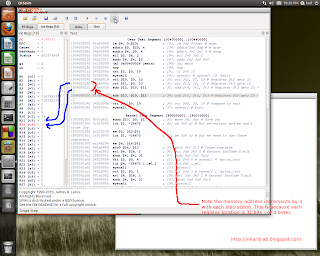
Note, too, that both the program counter and the register address increments by 4; this makes sense because a MIPS-32 register is 32 bits, or 4 bytes, long. Gotta love it when real-world experience actually matches what's in the book :)
The sequence of pictures below show the program as I stepped through it.
Ready, get set ...
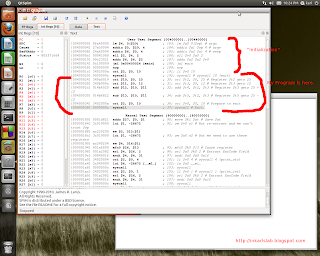
Now, we start stepping through the program:
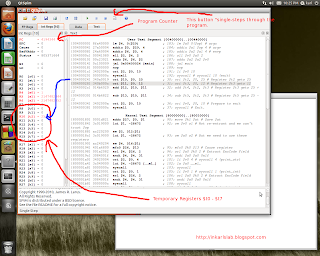
As we step, the "ori" instructions load constants into the registers in preparation for some simple math.
Addition completed:
Now, the subtraction just completed:
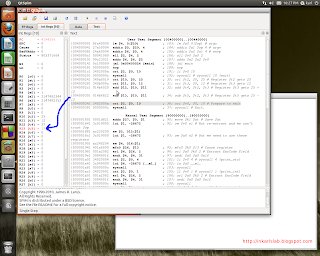
Program finished running:
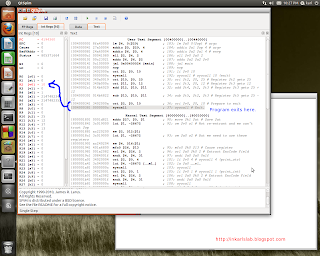
I would like to add that the creator of SPIM, Jim Larus, was of great help in answering my questions and emails during the installation of QtSPIM on my Fedora box. Mr. Larus is a true gentleman and has created a really cool and useful application - and I wanted to voice my appreciation for his efforts here.
# http://inkarlslab.blogspot.com
# 09/16/2011
#
# A Demonstration of some simple MIPS instructions
# used to test QtSPIM.
#
#
#
# ori rt, rs, imm - Puts the bitwise OR of register rs and the
# zero-extended immediate into register rt => This is a
# trick for placing a constant into register rt.
#
# add rd, rs, rt - Puts the sum of registers rs and rt into register rd.
#
# sub rd, rs, rt - Puts difference of registers rs and rt into register rd.
#
# syscall - Register $v0 contains the number of the system
# call provided by QtSPIM - when $v0 is loaded with the value '10',
# this causes program to exit.
#
# It calculates 25 + 12, and 25 - 12.
#
.globl main # Make main global so you can refer to
# it by name in QtSPIM.
.text # This line tells the computer this is the
# text section of the program
# (No data contained here).
main: # Program actually starts here.
ori $t2, $0, 25 # Register $t2 gets 25
ori $t3, $0, 12 # Register $t3 gets 12
add $t4, $t2, $t3 # Register $t3 gets 25 + 12
sub $t5, $t2, $t3 # Register $t5 gets 25 - 12
ori $v0, $0, 10 # Sets $v0 to "10" so when syscall is executed, program will exit.
syscall # Exit.
This program loads constant values into two temporary registers $t2 and $t3, using the ori command.
Here is a handy list of MIPS-32 commands:
http://www.mrc.uidaho.edu/mrc/people/jff/digital/MIPSir.html
The MIPS-32 Register file contains 32 registers - each is 32 bits long. Here is a list of them and how they're used:
http://msdn.microsoft.com/en-us/library/ms253512%28v=vs.80%29.aspx
Now, back to the code:
The contents in $t2 and $t3 are added and that value gets stored in another register, $t4. Then the contents of $t3 are subtracted from the contents of $t2, then stored in $t5. After all the work is done, register $v0 is set to "10", which is the code for "EXIT". Then the program exits.
Here, in a nutshell, is how to quickly write a MIPS-32 program and run it in QtSPIM:
1) Write your program in a similar style as I have above. You can do this in any text editor. Save the file as YOUR_FILENAME.asm .
2) Start QtSPIM. Under the "simulator" menu, select "clear registers". You should see some values "zero out" in the "register window" along the left-hand side of the QtSPIM panel.
3) Under the "File" menu, select "load file". A file browser window will pop up - locate your .asm file and select it. The program should load into QtSPIM.
4) Under the "Simulator" menu, select "Run Parameters". Enter "0x00400024" - without the quotation marks, into the box entitled "address or label to start running program". This simply tells QtSPIM which line your code starts on, since there is other initialization code that appears whenever you start QtSPIM. That code ends with a syscall at address 0x00400020.
5) Under the "Registers" menu, select "decimal". This will display the values in your register as normal base 10 (decimal) numbers, which helps us to easily verify that the math is being done according to design.
6) Using the single-step button seen in the second picture below, step through the program. You can also use "F10" on your keyboard - you may find this more convenient. Each time you click the button, note what happens to the values in each of the registers in the left hand window, as well as the program counter.
Note, too, that both the program counter and the register address increments by 4; this makes sense because a MIPS-32 register is 32 bits, or 4 bytes, long. Gotta love it when real-world experience actually matches what's in the book :)
The sequence of pictures below show the program as I stepped through it.
Ready, get set ...

Now, we start stepping through the program:

As we step, the "ori" instructions load constants into the registers in preparation for some simple math.
Addition completed:

Now, the subtraction just completed:

Program finished running:

I would like to add that the creator of SPIM, Jim Larus, was of great help in answering my questions and emails during the installation of QtSPIM on my Fedora box. Mr. Larus is a true gentleman and has created a really cool and useful application - and I wanted to voice my appreciation for his efforts here.
Friday, September 9, 2011
SPIM In a LINUX Environment
In my last post I discussed MIPS 32 and the SPIM emulator for running MIPS 32 assembly code on your PC. Today I will briefly talk about how I got SPIM running in a LINUX environment. My earlier post is located at http://inkarlslab.blogspot.com/2011/09/spim-mips-32-bit-simulator.html
The problem I was having yesterday was in compiling SPIM on a Fedora system. I was getting this error message when running the makefile:
make: *** No rule to make target `../CPU/spim.h', needed by `spim.o'. Stop.
All the files were there and apparently in their proper folders, ...
I am still in communication with someone in attempt to get that figured out. The person helping me suggested I try installing the pre-compiled Debian binary. So I downloaded the 32-bit Debian file for QtSPIM from the following link:
SPIM MIPS Simulator Homepage - You can find more information and LINUX versions by going here.
http://spimsimulator.sourceforge.net/
I next unpacked it with the GNOME "File Roller" tool and extracted everything to the "SPIM" directory I had created earlier. Basically that's it. There are two ways to run QtSPIM from this installation.
Suppose you installed your "SPIM" directory in your home directory:
1) On the command line, simply navigate to the "SPIM" directory, then to "/usr", then to "/bin". NOTE that these /usr and /bin directories are NOT the same ones as are in your UNIX file system! Once you are in /bin, type qtspim to start the application, or
2) locate the SPIM/usr/bin folder via the GNOME desktop and click on the QtSPIM executable.

As you can see, QtSPIM is now running on a Fedora system. Having never tried to install a Debian executable on Fedora, I thought this was pretty cool.
The problem I was having yesterday was in compiling SPIM on a Fedora system. I was getting this error message when running the makefile:
make: *** No rule to make target `../CPU/spim.h', needed by `spim.o'. Stop.
All the files were there and apparently in their proper folders, ...
I am still in communication with someone in attempt to get that figured out. The person helping me suggested I try installing the pre-compiled Debian binary. So I downloaded the 32-bit Debian file for QtSPIM from the following link:
SPIM MIPS Simulator Homepage - You can find more information and LINUX versions by going here.
http://spimsimulator.sourceforge.net/
I next unpacked it with the GNOME "File Roller" tool and extracted everything to the "SPIM" directory I had created earlier. Basically that's it. There are two ways to run QtSPIM from this installation.
Suppose you installed your "SPIM" directory in your home directory:
1) On the command line, simply navigate to the "SPIM" directory, then to "/usr", then to "/bin". NOTE that these /usr and /bin directories are NOT the same ones as are in your UNIX file system! Once you are in /bin, type qtspim to start the application, or
2) locate the SPIM/usr/bin folder via the GNOME desktop and click on the QtSPIM executable.

As you can see, QtSPIM is now running on a Fedora system. Having never tried to install a Debian executable on Fedora, I thought this was pretty cool.
Subscribe to:
Posts (Atom)
Subscribe To

 Posts
All Comments
Posts
All Comments


